Hue Bridge Pro Migration Stuck on “Update Your Bridge Pro”? Why It’s a Known Bug (October 2026)
Your Hue Bridge Pro migration is stuck on “Update your Bridge Pro” even though the bridge is already up to date? It is not your network — it is a known Philips Hue software bug, confirmed by their support in early October 2026 with no fix date. Resetting the bridge in a loop does nothing. The reliable route is to skip the migration and set the Bridge Pro up from scratch.
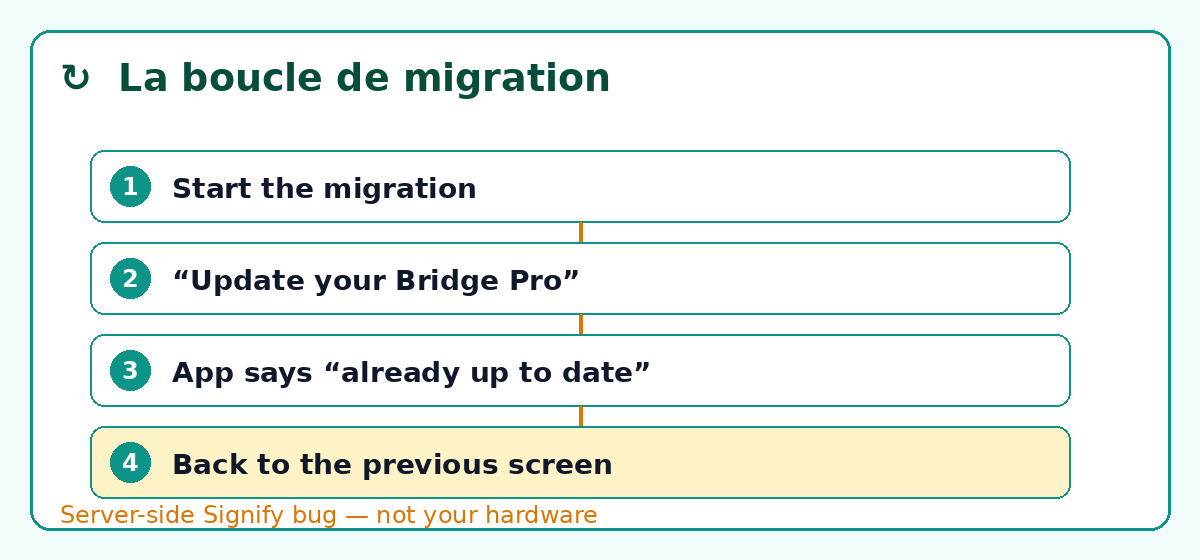
The issue has been running since late September 2026 and resurfaces on the same forums every day. The scene never changes: you start the migration from your old bridge, the app offers an update, you accept, and a message sends you back to the previous screen claiming the bridge is already up to date. You try again the next day, and it starts over. We cross-checked eight live threads across six platforms — r/Hue, community.hueessentials.com, community.home-assistant.io, community.smartthings.com, community.hubitat.com and the German hueblog.de forum — and every claim in this guide is tied to its dated source. Anything we cannot confirm is spelled out as “to be investigated”: we do not fill the gaps with guesses.
The short version. The “Update your Bridge Pro” loop is a software incident on Signify’s side (Philips Hue), not a failure of your hardware. Support confirmed an ongoing investigation with no ETA, and is even blocking warranty replacements on the grounds that it is a software bug. In the meantime, the only reliable path is a clean install of the Bridge Pro instead of waiting for the migration.
What is actually happening when the migration gets stuck
How a Bridge v2 to Bridge Pro migration is supposed to work
On paper, the migration is a configuration transfer. You plug in the Bridge Pro, the app discovers it, it copies your lights, rooms, scenes and automations from the old bridge, then you unplug the old one. Philips Hue documents the process in its official help centre: pair the new bridge, then go to Settings > Bridges > [bridge name] > Migrate. It is an appealing promise — nobody wants to re-pair forty bulbs on a Sunday afternoon. That is exactly why the current loop is so annoying.
The exact blocker: “Update your Bridge Pro to continue”
The user who opened the most detailed thread (r/Hue, 1wwgu4c, 3 October 2026) describes the loop without ambiguity: “The migration wizard repeatedly stops at ‘Update your Bridge Pro to continue’. When I select Update, the app says the Bridge Pro is already up to date and then sends me back into the same loop.” In other words, the wizard detects that the bridge needs an update, but when the app queries the server, the server answers that the firmware is up to date — and dumps the user back at the start. The behaviour is identical on Android and iOS, and it survives a factory reset of the Bridge Pro. Versions recorded that day: Hue app 6.2.0 (25945), Bridge v2 on 6.1.1978418030, Bridge Pro on 6.1.2071524030.
A second user, Worldly-Roof, confirms the same thing word for word: “I have the same issue. […] now it keeps complaining that my old bridge needs an update. Both have the new versions.” So the diagnosis fits in one sentence: it is a failed update handshake between the app and Signify’s servers, not a local fault.
Not to be confused with the June 2026 bug
This is the trap when you go looking for a fix: the tech press wrote extensively about a different incident. In June 2026 an update left a small batch of Bridge Pro units unusable; the fix 2071401010 shipped in July 2026 and affected fewer than 100 devices worldwide, according to hueblog.com. If you land on those articles, keep in mind they describe a problem that has already been solved. The October 2026 loop is a separate, still-open incident, and it hits the migration, not a bridge that is already running.
Philips Hue’s official position
A known issue, with no ETA and no notification
The same user contacted support and shared an eye-opening exchange: “I contacted Philips Hue Support. They initially started a warranty replacement, but their system then blocked the replacement because this problem is apparently flagged as a known issue. Support confirmed that there is an ongoing investigation and that they are working on a fix. They couldn’t provide an ETA and said they won’t proactively notify affected users.” What that means for you: support recognises the bug but will not tell you when it is fixed. Do not wait for an email — you will have to test again yourself.
“Migration is not available this weekend”: Signify is switching the feature off server-side
Another clue pointing to a server problem: one user (redness42) posted a screenshot where the app states that migration is not available this weekend. That is the hallmark of a Signify-side switch-off, probably to contain the wave. We do not yet know whether the cut is global or limited to certain accounts — so we list it as “to be investigated”.
The affected versions
| Component | Version recorded (03 Oct 2026) | Status |
|---|---|---|
| Philips Hue app | 6.2.0 (25945) | Affects Android and iOS |
| Old Bridge (v2) | 6.1.1978418030 | Up to date, but seen as incomplete |
| Hue Bridge Pro | 6.1.2071524030 | Up to date, but blocked by the wizard |
| June bug firmware | fix 2071401010 (July 2026) | Different incident, already resolved |
If your version numbers match that column, you are very likely in the same boat. It is not absolute proof (we do not run a Hue lab), but it is the most coherent set of clues available today.
What you should absolutely not do
Resetting the bridge over and over
It is the first reflex, and it is a waste of time. The user behind the main thread did a factory reset of the Bridge Pro; the loop came straight back. Support itself called the problem software, not hardware. Every reset costs you a full re-pairing without ever touching the real cause, which sits on Signify’s servers.
Waiting for a warranty replacement
Again, the thread is clear: the replacement was started and then automatically blocked because the issue is logged as a software bug. As long as firmware is the culprit, hardware warranty does not apply. Pushing support on that front will likely cost you time rather than fix your lights.
Trying from several phones
Nothing in the reports suggests a different phone changes anything — the loop is identical on Android and iOS. Using a second device just adds a variable, not a solution.
⚠️ The rule to remember: if the app tells you “already up to date” while the wizard demands an update, do not restart the process. You are going in circles inside a server-managed loop, and your existing scenes survive a pause far better than a run of resets.
The reliable alternative: a clean install instead of the migration
This is the recommendation that keeps coming up among people who got out of the loop. One user put it plainly: “I actually decided to do a complete new clean install. It cleared all sort of little niggles and personally think it was worth the effort.” (PM5140). Yes, you have to re-pair the bulbs one by one. No, it is not glamorous. But you start from a clean base, and you no longer depend on a server’s goodwill to get your lighting back.
The clean-install procedure, step by step
- Write down your current setup first: room names, the scenes and automations that matter, light settings. Take screenshots. This is what saves you from reinventing everything.
- Add the Bridge Pro as a brand-new bridge in the app, rather than going through the migration wizard.
- Re-pair your lights one by one (the 6-digit serial number is on each bulb; strips and fixtures are found via “Light not detected”).
- Recreate your rooms and scenes from your screenshots — that is the real time cost, budget a good hour for a well-equipped home.
- Plug the old bridge back in only if you want to compare before retiring it. Do not keep two active bridges long term: you will end up with duplicated devices.
- Remove the old bridge from the app once everything runs on the new one, then delete it from your Hue account.
Migrate or clean install: the real trade-off
Clean install
- ✅ Works today, no waiting for a fix
- ✅ Starts from a clean base, no legacy settings
- ❌ Every light must be re-paired by hand
- ❌ Scenes and automations rebuilt from scratch
Wait for the migration
- ✅ Scenes and automations preserved if it goes through
- ✅ Less effort once the fix lands
- ❌ No fix date has been given
- ❌ You could be blocked for days or weeks
If you would rather wait: keep the old bridge running
If you only have one bridge to migrate, you can simply postpone the job and carry on with your Bridge v2, which the app still supports. The migration is started from Settings > Bridges > [bridge name] > Migrate — it is an on-demand command, not a forced move. As long as your lights respond, there is no technical urgency to switch.
How to know when the fix has arrived
Since support warned it will not notify users, the only reliable method is to retest periodically: open the app, start the migration and see whether the loop is gone. You can also watch the r/Hue and community.hueessentials.com threads, where the first unblocked users usually tip off the others. As the incident has been “under investigation” for several days, a fix could land overnight — or drag on for weeks.
After a successful migration: what breaks and must be redone
Better to know upfront: even when the migration goes through, it leaves traces in third-party ecosystems. Here is what users who lived through it report.
Apple Home / HomeKit: the bridge shows up as a new device
The murkiest and most frustrating part of the whole story. Some users had to reassign every light to its room in the Home app after migrating; others had nothing to redo. One user even described lights that “randomly moved from their Home room to the room the Hue Pro was assigned to”. The accounts genuinely contradict each other, and we would rather say so: plan time to check your HomeKit rooms rather than betting everything transfers on its own.
Home Assistant: the Hue integration did not follow straight away
Good news here: the Hue integration did not create new entities at launch, but the problem was resolved in Home Assistant 2025.9.1 (confirmed on community.home-assistant.io, thread t/927325). If you are up to date, there should be nothing special to do — just remember to restart Home Assistant after the migration so entities refresh.
SmartThings and community drivers: duplicated devices, routines to rebuild
If your Hue is linked to SmartThings over LAN directly or via a community Edge driver, the new bridge generates a new identifier. The result: your devices show up twice and your routines must be reconfigured (community.smartthings.com, thread t/309961). Under Hubitat, expect manual recovery too. Plan this cleanup after the new bridge is stable.
| Ecosystem | Effect after migration | What to do |
|---|---|---|
| Apple Home / HomeKit | Bridge seen as a new device | Check and reassign rooms |
| Home Assistant | Entities not recreated (older versions) | Update to 2025.9.1+, restart |
| SmartThings | Duplicated devices (new ID) | Delete duplicates, rebuild routines |
| Hubitat | Manual driver recovery | Re-associate, recheck automations |
“My Hue goes unreachable once a week” — a different problem
A third thread (r/Hue, 1wvtv28, 2 October 2026, “Hue hub needs frequent power cycles”) describes a bridge that demands regular restarts. Do not confuse it with the migration loop: that is a network stability issue, not an update one. The usual causes remain an underpowered USB supply, a network switch going to sleep, or an IP address conflict. The cure is often a better cable and power supply. If your lights play these tricks, our guide to Matter devices that won’t connect covers these symptoms in detail.
Troubleshooting checklist, in order
- Check the versions of the app and both bridges (Settings > Bridges).
- Do not reset the Bridge Pro: it will not break the loop.
- Try the migration once a day, not ten times: it is a server problem, not a patience problem.
- If you are in a hurry: switch to a clean install (previous section).
- If you can wait: keep the old bridge and postpone the migration.
- After success: go through HomeKit, Home Assistant and SmartThings to verify rooms, entities and routines.
- No official fix yet: watch the community threads rather than your inbox.
For more on the mechanics of updates that never arrive, our Matter/Thread firmware update guide breaks down the server-side blockers. And if you are expanding your setup, take a look at our round-up of the best smart light switches, our outdoor lighting install guide, and — to put the bridge itself in context — our Philips Hue vs IKEA vs Xiaomi comparison.
Frequently asked questions about the stuck Hue Bridge Pro migration
Does a factory reset fix the migration?
No. The user who opened the main thread did a full factory reset of the Bridge Pro, and the loop came back exactly the same. Support classified the problem as a software bug: a client-side reset cannot correct an error managed on Signify’s servers. You will only lose a re-pairing.
Will Philips replace my bridge under warranty?
In the documented case, the replacement was started and then automatically blocked, on the grounds that the issue is logged as a software bug rather than a hardware fault. This matches standard policy: the warranty covers faulty hardware, not a firmware malfunction fixed by an update.
Can I migrate several bridges in a row?
Technically yes, one bridge at a time, but there is no point chaining them while the loop is active: every attempt ends with the same return to the previous screen. If you run multiple sites, treat them independently and do not count on a batch migration.
Do I have to reconfigure everything in HomeKit after migrating?
Not necessarily, and that is exactly the murky part. Some users reassign every light to its room, others do nothing at all. Budget time to check the Home app room by room after the switch, rather than betting on a transparent migration.
Are my scenes and automations preserved?
If the migration goes through, yes, they transfer with the configuration. If you do a clean install, no: you have to recreate them. That is the main argument for waiting — provided you accept an indefinite delay, since the fix has no date.
How do I go back to the old bridge if things go wrong?
The old bridge keeps working as long as you have not removed it from your account. If the migration fails, plug it back in and return to your original setup: your lights come back as before. So do not delete the old bridge from your account before you are sure the new one is stable.
Is it my Wi-Fi network causing this?
No, not in this case. The loop appears before the migration even touches the lights’ network: it is a software handshake between the app and Hue’s servers. Slow Wi-Fi will drag things out, but it does not cause this precise bounce-back on the “Update your Bridge Pro” screen. Do not buy a new router for this symptom.
When will the official fix land?
Unknown as of today. Support mentions an ongoing investigation with no date, and has not planned to notify users. Two weeks after the first reports, no corrective firmware had been published. We will update this guide if the situation changes.
Should I flash the firmware manually via a dongle or a third-party tool?
We advise against any such tinkering on a Philips Hue bridge: the loop comes from the server, not from a local firmware you could swap out. No reliable, safe hardware workaround is documented as far as we know — we would rather write “to be investigated” than have you mess with a device still under warranty.
Is the Bridge Pro still worth it?
The hardware itself is not at fault in this incident: the Bridge Pro remains Hue’s newest bridge, with Thread/Matter support and greater capacity. If you start from a fresh install rather than a migration, you avoid the loop described here. The irony is that the simplest way to enjoy the new bridge today is… not to migrate.
About the author: Alex Mercer, tech and smart-home writer at Logis-Connect. Since 2020 he has installed and tracked connected ecosystems (Matter, Thread, Zigbee, Hue) in real homes, with dated and verified sources. See his other guides.
Last updated: 6 October 2026 — sources: r/Hue (1wwgu4c, 1wrr3st, 1wvtv28), community.hueessentials.com (t/14301, t/14297, t/13479), community.home-assistant.io (t/940723, t/927325), community.smartthings.com (t/309961), community.hubitat.com (t/159866), hueblog.de forum, Philips Hue support, hueblog.com (14/07/2026). Uncertainties flagged “to be investigated”; no official fix published as of 6 October 2026.
* Disclosure: some links in this article are affiliate links. If you buy through them, we may earn a commission at no extra cost to you. Our testing and rankings stay independent and are never influenced by partners.